
How to do SEO in Shopify


- How to do SEO in Shopify
- 2025 - the year that was
- 2024 - the year that was
- 2023 - the year that passed
- Set realistic requirements for yourself and the web agency when you need a new website
- Coffee meeting with Kasper Knudsen (Meta, AI & Mentor Programme)
- 2022 - the year that passed
- 2021 - the year that passed
- How do you choose an unemployment insurance fund as self-employed?
- 5 industries that can benefit most from using SEO strategies today
- What media is good for marketing?
- All posts
How to do SEO in Shopify - the beginner's guide
Search engine optimisation (SEO) is the practice of making your website appear as a top result on Google and other search engines.
In this post, we'll cover all the elements you need to know in order to be successful with SEO if you run a Shopify webshop.

This article contains the following topics:
Introduction to Shopify and Search Engine Optimisation?
What is basic SEO?
Search terms / Keywords
Page Title tag
Meta Description
Page headers/headlines
ALT text of the image
Content/Content
Links and anchor text
Sitemaps
Migrating to Shopify
Introduction to Shopify and Search Engine Optimisation
If you have your website/webstore built in Shopify, you are guaranteed to have a website that is created with excellent functionality, a custom design that even the biggest e-commerce giants fear, and product images so delicious that you would be happy to buy from yourself. However, we all know the reality that we need to have customers other than ourselves, and you need visitors to your website so you can increase revenue and profitability with Shopify.
This is where marketing becomes the key to your long-term success as an online retailer. By applying the correct search engine optimisation (SEO) to your Shopify store, you will eventually be able to stay ahead of your competitors who don't yet understand that getting visitors to their website requires a successful marketing strategy that includes SEO.
Shopify contains powerful SEO features that make it easy for you as a user to start your SEO work. In Shopify you can, among other things, work with:
- Title tags, meta descriptions and URL structure for your pages.
- ALT tags for all images, customisable image file names (can be automated, but not recommended)
- Automatically generated sitemap.xml and robots.txt files
- Automatically generated canonical URL tags (to avoid duplicate content)
This post will guide you on how to get started with SEO in Shopify. In very basic terms, this is a guide on how you as a beginner can get started with improving your SEO in your Shopify, and thereby become more visible in Google's and other search engines' results.
If you don't know what SEO is yet, I recommend you first read a little about what seo is, and then jump back here and continue.
Basic SEO
In the SEO industry, the phrase "Content is king" is often used. It is not without reason that such a characteristic expression has been chosen, but rather because it has a great effect on your SEO efforts. If you want people to find your website in the organic results, you should have text on your website that Google can read and get an overview of what your website contains. The text should of course be about what you want to be found on, so you sell Black rubber boots, your text should be about these black rubber boots, or at least include Black rubber boots in his text.
Keyword / Keyword
Keywords are what your potential and current customers use to search for information online. Keywords are the phrase we use when we search in Google for a specific product.
If you run an online store, it's essential that you know which keywords your customers are using so that you can target your texts and website towards them.
Let's assume again that you sell, for example shoe. Shoes as a keyword is a very broad keyword, so it's important for you to divide your website into subcategories, which could include "leather shoes", "leather boots", "rubber shoes", so that you can target your texts so that the consumer can find exactly what you sell via a Google search.
When you divide your items into groups, either on brand name or typeBy doing so, you make it easier for Google to see what your pages are about, increasing your chances of achieving a ranking that will bring you traffic from consumers eager to buy.
How do I know what my customers are searching for on Google?
It's challenging to put yourself in the consumer's shoes. Often you can only assume what the consumer is searching for, and this is not valid enough for you to base your SEO efforts on intent.
A useful tool you can use to brainstorm and discover new keywords is Google's own tool called Google Keyword Planner(keyword planner) that helps you see the number of searches on selected phrases. It helps you determine the most popular keywords in your industry and the number of searches.
Google Keyword planner can also give you suggestions for related keywords and also give you the number of searches for those words.
Now that you know which keywords you want to target, you need your on-page content to address the keywords you want to be found for. This applies to the front page, product pages, blog posts, collection texts, etc. However, try to use one keyword everywhere and not the same one on multiple pages.
There are five primary locations on a given shopify website, where you can use your keyword to your advantage:
- Page Meta Title
- Meta description
- H1'tag
- Alt tags
- Page content
Meta Title
Title tag, also called meta tag, is one of the most important elements in on-page search engine optimisation, also when working in Shopify. The title tag is used on all pages, products, collections, blog posts, etc. and can be set in your Shopify Admin backend.
The title is the clickable link that you find in Google search results.

General about meta titles:
Search term/keyword: Include your most important keywords in your title.
Length: 70 characters is the maximum number of characters that most search engines will display, however, it is recommended that you stay under 55 characters.
Branding: If you want to include your online store's name, it's a good idea to do so at the end of the title.
Readability: Always make sure your title tag is readable. Potential customers won't click on a title that isn't worded correctly or contains spelling mistakes.
If we want to change the title of our SHOES collection, change your SHOPIFY meta title as follows:
Products -> Collections -> Select the SHOES collection -> Scroll all the way down -> Edit website SEO

Some Shopify Themes put automatic your webshop's name after your title, and if yours does this, you should change this. Contact us if this causes you any problems.
Meta description
A "meta description" is the short piece of text that shows up in a search engine like Google after your title tag, i.e. the text below it.
Just like the Title tag, this needs to be unique and one should be formulated for each page/product/blog post etc.
Search term/keyword: Always include your keywords 1-2 times in your meta description.
Length: If you stay under 155 characters, that's good - try to get as close to 155 characters as possible.
Readability: Your Meta description should be readable and contain the elements that the consumer can expect to find on your page.
This is changed in the same way as before for the meta title.
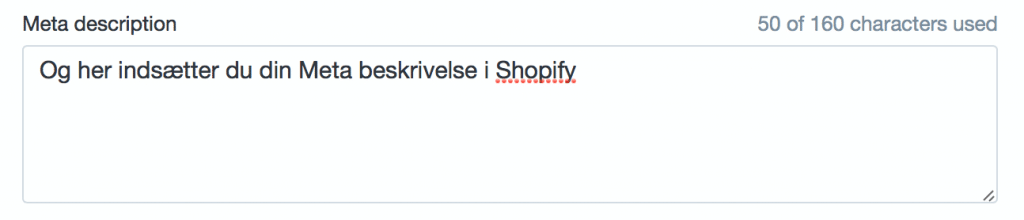
However, we do not recommend using 160 characters, but only 155.
Page headlines / Headlines
Headlines, also called H1' H2' H3' etc, are the sub-categories into which we divide our posts, texts etc.
The most important is the 'H1' tag. This is often used as the page header and should therefore contain at least one of your keywords. In Shopify, the product name is always your H1, so you should have a product name that describes your product well.
Let's assume you're selling shoes again.
The product you are creating is a pair of red Adidas trainers. Your H1s here could usefully be: "Adidas trainers - red"
This will increase the likelihood of your product showing up when people search for words like "Adidas trainers", "Red trainers" "Red adidas shoes" etc.
Image alt text
Google and other search engines can read words and content on your website, but computers have a hard time knowing what the content of an image is. The image's file name and alt text are used to describe the content of the image.
Using ALT text increases the likelihood of your product images showing up when customers search for images, increasing your online visibility, not only on the text front, but also image-wise.
(ALL text is also what is displayed if the web can't load the image, so avoid keyword stuffing it and let it make sense to the consumer).
To set alt text for a product image, hover over the image and click "Edit alt text":

Once clicked, this "box" will pop up in your browser window.

Remember to do this for all your images, even those that are not product images.
Content/content
Content/text content is one of the biggest ranking parameters in Google, which also reflects the importance of having good content on your webshop.
The more descriptive and rich your product description is, the easier it is for Google to read what your product is and therefore the likelihood of a good ranking increases.
ALL your product texts should be unique to avoid duplicate content, which Google definitely doesn't like. So don't copy your suppliers' descriptions or those of your competitors.
Good content is also important for your landing pages, blog posts and collection texts.
You can't just use a few words if you want Google to find your posts, write some good posts that have some good text content.
Link building / anchor texts
Links
Links (hyperlinks) are when another website links to your site and this increases the credibility of your domain. You should see it as other websites recommending yours and therefore Google is more willing to give you good rankings as you are recommended from other sites.
However, there is a difference between good and bad links, avoid getting bad links from link catelogs or comment fields on blogs.
You can read more about link building here
Anchors tecstasy
This is the text that acts as a link to your webshop and is very important.
If another website links to your online store with the words "click here", Google will probably think that the website should show up when people search for "click here".
Instead, it's a good idea to ask people to link to your website by name or your main keywords. If you sell the red adidas shoes from before, it would be beneficial to get inbound links with the text "Red adidas shoes".
Sitemaps in Shopify
All Shopify online stores contain an automatically generated sitemap.xml file that contains all your products, pages, collections and blog posts. These sitemaps also support Google's image sitemap extension.
The sitemap file is located at the location "Sitemap.xml" in your webshop URL (e.g. www.dinshopifyshop.dk/sitemap.xml.
You can use tools like Google Analytics or Google Webmaster tools to control your website so that Google indexes your content much faster.
Migrating to Shopify
If you have an online store that is on a different platform/operating system, it is possible to move your store to Shopify, and it is possible to do so with almost no loss of organic traffic from Google. Shopify automatically creates URL redirects for all your pages.